Trade Up to 1:2000 Leverage on MT5
Access the Latest and Most Advanced MetaTrader Platform
easyMarkets MT5 Features
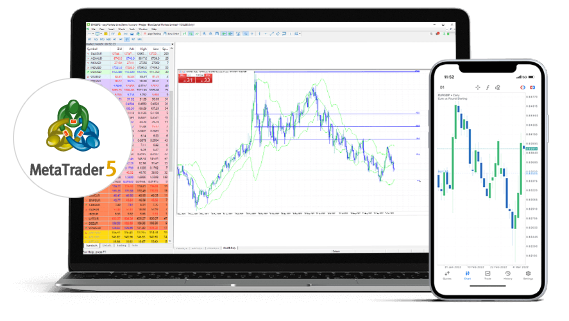
- 21 Different Chart Timeframes from 1 min to 1 month
- 38 in-built technical indicators
- Use expert advisors
- Download 20+ years of historical data
- Available on desktop, mobile and web
easyMarkets Conditions on MT5
- Variable Spreads from 0.7 pips
- Up to 1:2000 leverage
- Negative balance protection
- No commission or hidden fees
Dynamic Leverage
With Dynamic Leverage, leverage is calculated based on the number of lots you trade. As your overall volume changes, your available leverage and margin requirements can adjust automatically, helping you keep a closer view of exposure and margin while you trade.
Included instruments
CADCHF
CADJPY
CHFJPY
EURCAD
EURCHF
EURGBP
EURJPY
EURUSD
GBPCAD
GBPCHF
GBPJPY
GBPUSD
USDCAD
USDCHF
USDJPY
| Lot Tiers | Leverage |
|---|---|
| 5 | 1:2000 |
| 20 | 1:400 |
| 40 | 1:200 |
| 60 | 1:100 |
| Above | 1:50 |
Included instruments
AUDCNH
AUDNZD
AUDSGD
CNHJPY
EURCNH
EURNOK
EURNZD
EURPLN
EURSEK
EURSGD
EURZAR
GBPNZD
GBPPLN
GBPSGD
GBPZAR
NZDJPY
NZDUSD
USDCNH
USDHKD
USDMXN
USDNOK
USDPLN
USDSEK
USDSGD
USDZAR
| Lot Tiers | Leverage |
|---|---|
| 5 | 1:500 |
| 10 | 1:400 |
| 20 | 1:200 |
| 40 | 1:100 |
| Above | 1:50 |
Included instruments
AUDCAD
AUDJPY
AUDUSD
CHFAUD
EURAUD
GBPAUD
| Lot Tiers | Leverage |
|---|---|
| 5 | 1:500 |
| 10 | 1:400 |
| 20 | 1:200 |
| 40 | 1:100 |
| Above | 1:50 |
Included instruments
XAUUSD
| Lot Tiers | Leverage |
|---|---|
| 3 | 1:400 |
| 10 | 1:200 |
| 20 | 1:100 |
| 30 | 1:50 |
| Above | 1:25 |
Included instruments
XAGUSD
| Lot Tiers | Leverage |
|---|---|
| 5 | 1:100 |
| 10 | 1:50 |
| 15 | 1:25 |
| 25 | 1:10 |
| Above | 1:5 |
Included instruments
CPRUSD
XPDUSD
XPTUSD
| Lot Tiers | Leverage |
|---|---|
| 5 | 1:100 |
| 10 | 1:50 |
| 15 | 1:25 |
| 25 | 1:10 |
| Above | 1:5 |
Included instruments
ASXAUD
CNXUSD
DAXEUR
DOWUSD
ESXEUR
FTSGBP
HSXHKD
NDQUSD
NKIUSD
SPIUSD
SWICHF
USXUSD
| Lot Tiers | Leverage |
|---|---|
| 3 | 1:400 |
| 6 | 1:200 |
| 9 | 1:100 |
| 15 | 1:50 |
| Above | 1:25 |
Included instruments
BRTUSD
GASUSD
HEOUSD
NGSUSD
OILUSD
| Lot Tiers | Leverage |
|---|---|
| 5 | 1:100 |
| 10 | 1:50 |
| 20 | 1:25 |
| 30 | 1:10 |
| Above | 1:5 |
Included instruments
CCOUSD
CFEUSD
CRNUSD
CTNUSD
SGRUSD
SOYUSD
WHTUSD
| Lot Tiers | Leverage |
|---|---|
| 2 | 1:100 |
| 10 | 1:50 |
| 15 | 1:25 |
| 20 | 1:10 |
| Above | 1:5 |
Included instruments
BTCUSD
| Lot Tiers | Leverage |
|---|---|
| 1 | 1:200 |
| 2 | 1:100 |
| 5 | 1:50 |
| 20 | 1:25 |
| Above | 1:5 |
Included instruments
ETHUSD
| Lot Tiers | Leverage |
|---|---|
| 1 | 1:100 |
| 2 | 1:50 |
| 5 | 1:20 |
| 20 | 1:10 |
| Above | 1:5 |
Included instruments
ADAUSD
ALGUSD
AVAUSD
BCHUSD
CHZUSD
DOGUSD
DOTUSD
DSHUSD
LNKUSD
LTCUSD
MTCUSD
OMGUSD
SOLUSD
UNIUSD
XLMUSD
XMRUSD
XRPUSD
ZECUSD
| Lot Tiers | Leverage |
|---|---|
| 1 | 1:50 |
| 2 | 1:20 |
| 5 | 1:10 |
| 20 | 1:5 |
| Above | 1:2 |
Included instruments
AUCAUD
CACEUR
CNCUSD
DECEUR
DJCUSD
ESCEUR
EUCEUR
HKCHKD
MIBEUR
NKCJPY
NQCUSD
SPCUSD
SWCCHF
UKCGBP
| Lot Tiers | Leverage |
|---|---|
| 30 | 1:400 |
| 50 | 1:200 |
| 60 | 1:100 |
| 100 | 1:50 |
| Above | 1:25 |
As you move into higher lot tiers, the maximum leverage available aligns with the tier shown in the table, which may increase the margin needed to maintain your positions. Because your applicable tier is based on your total lots, it is important to monitor overall exposure, particularly when opening additional trades.
Variable Spreads
One of the key differences between easyMarkets MT4 and MT5 platforms is the spread. Unlike our MT4 platform, where we only offer fixed spreads, all spreads on our MT5 platform are variable*. This means that the spread you pay depends on market conditions. So, for instance, if there’s low volatility in the markets and high liquidity, you can expect to pay a smaller spread. Conversely, if there’s high volatility and low liquidity, you can expect to pay a larger spread.
At easyMarkets, we’re always seeking to provide our clients with the best possible trading experience, which is why we have decided to offer our clients both fixed and variable spreads. Giving you the freedom of choice to decide which way you want to trade!
*Please note that variable spreads are subject to slippage.

What is MT5?
MT5 is one of the most powerful multi-asset platforms available to traders. Building on from the popular MT4, the latest MetaTrader platform has some great new features, including faster processing speeds, more advanced chart indicators and a built-in economic calendar.
The Metatrader 5 platform is also highly customizable, with the option to customize symbols, advanced charts and indicators.
Why use MT5?
MT5 is fast and flexible and is perfect for experienced traders looking to take advantage of more advanced and customizable trading tools. If you also prefer to trade with variable spreads, then it’s the platform you want to use.
MT5 FAQs
On MT5, you can save your Trade History in HTML form or as an Excel and use it as your Account Statement for your records. Here’s how:
- Launch your MetaTrader 5 platform.
- Find your toolbox window at the bottom of your screen. If its hidden, you can enable it by clicking View and Toolbox (or CTRL+T).
- Go to the ''History'' tab and right click within the area.
- Click on "All History" to view your complete trading history, or select a specific time period including "Last 3 Months" and "Last Month" from the drop-down menu. You can select a more specific period by clicking "Custom Period ".
- Right-click again in the "History" area.
- In the drop-down menu, hover over "Report" and select the file format you prefer (HTML or Excel) to save your report.
- Select your report’s Save Location.
- A new browser window will open, displaying your trade activity report in your specified format.
- To print an HTML report, right-click on the file and select "Print". For an Excel report, go to "File" in the upper left corner and choose "Print" to print your report.
First, you’ll need to create an account with easyMarkets. After this, you can log in and revisit this page, where you’ll be prompted to download MT5 to your device.
If you’re already familiar with MT4, then you should have no problem adjusting to MT5 as the functions and features are very similar. If you’re not familiar with MT4, then don’t worry. We will be releasing an MT5 guide soon that will deep dive into using the platform.
If you wish to use MT5, you need to follow a few simple steps:
- Create an easyMarkets account
- Download and install Metatrader 5 on your device.
- Use your login credentials provided to you during the sign-up process
- Deposit into your MT5 account
- You can now trade all of easyMarkets 135+ instruments on MT5
Metatrader 5 is available on Windows, Mac, iOS, and Android.
- Open MT5
- Find the Navigator
- In the Navigator menu, locate Custom Indicators
- Click on that option, and your custom indicator should be displayed.
- Double click your new custom indicator and the Properties (for indicators) window pop up.
- Click OK.
MT4 and MT5 share many similar functions and features, but MT5 is considered a slightly more advanced version of MT4. So, if you are a complete beginner at trading, then it may be better for you to begin trading on MT4.
To begin trading on any of easyMarkets trading platforms, you must make a minimum deposit of $25.
You can trade all of easyMarkets 135+ instruments, including cryptocurrencies, shares, forex, metals, commodities and indices.
Yes, you can. We allow you to download and build EAs on both MT4 and MT5.
What our Traders say about easyMarkets

Innovating since 2001
easyMarkets has been serving its customers since 2001. From the very beginning we have strived to offer our clients the most innovative products, tools and services.

5 Star Trustpilot Rating
Since 2001 easyMarkets has strived to offer the highest level of customer support possible with exclusive risk management tools, 24/5 customer support and conditions which help our traders.

Trade On Mobile
easyMarkets innovative and intuitive app allows you to trade on any iOS or Android device, giving you access to markets anywhere, anytime.